
Apple Makes Leaving the iPhone Behind Easier
Tired of the endless hassle when jumping from iPhone to Android or back again? Apple and Google may have cracked the code with a seamless transfer tool. Here’s why this update could change switching forever.
If you’ve been annoyed by switching from an iPhone to Android or the other way around because of the tedious process, there’s an upcoming solution. Apple and Google are now working on making the switch seamless and faster.
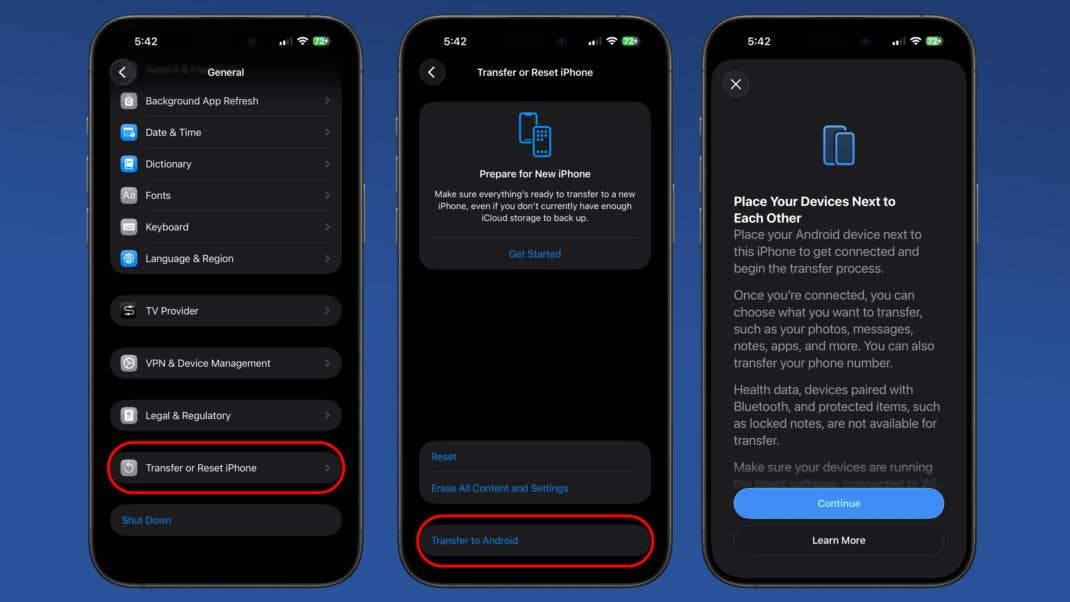
Following Google’s own enhanced transfer feature found in the Android Canary build, Apple has now added its own built-in transfer tools in iOS 26.3 Beta. This suggests that it could be released in the public build of the update to eligible iPhones sometime next year.
Ditching Your iPhone Is Now Faster
The feature appears to be almost ready, with complete verbiage and visual guides for transferring data from an iPhone to Android.
Before starting, note that the iPhone and Android devices should be placed beside each other with Bluetooth and Wi-Fi turned on. There are two methods for handshake authentication, which are scanning the QR code on an Android device or entering a temporary PIN.
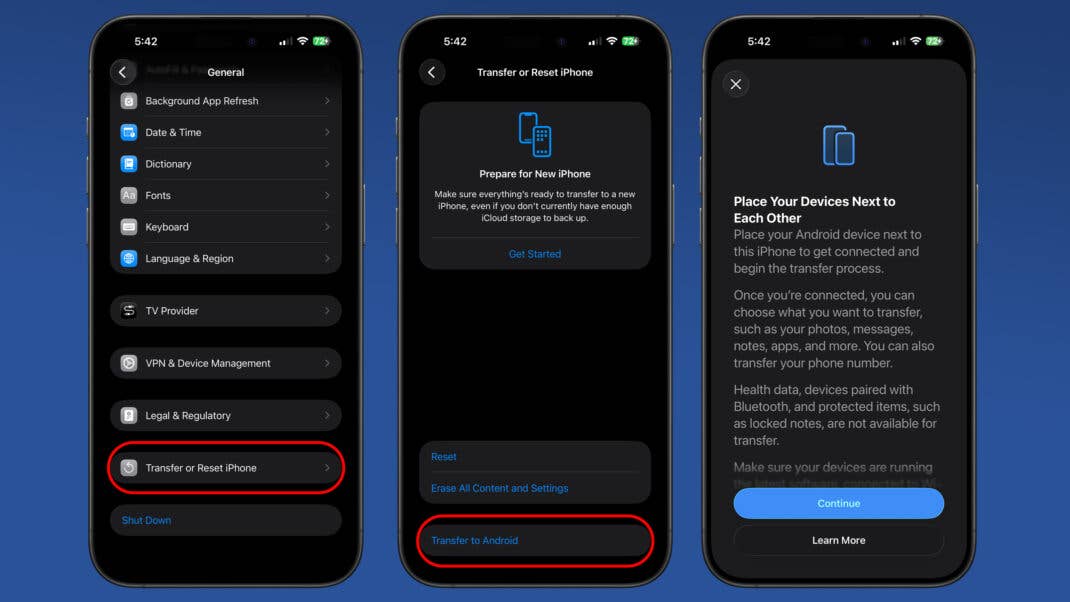
What makes this different from the current transfer process is that users won’t need to install a separate app when transferring data, unlike the current process used on both iPhone and Android.
Users can transfer media such as photos and videos, messages, apps, contacts, phone numbers, and passwords. What’s not covered are locked files and notes, health data, and data from paired Bluetooth devices.
Of course, this is a two-way feature, making transfers from Android to iPhone faster and more convenient.
In addition, both iPhone and Android devices should be on their latest software. It’s unclear which version it will be for Android, but it could be tagged with an upcoming minor build of Android 16, since Android 16.1 or QPR2, which was released on the Pixel last month, lacks the equivalent feature.
The new cross-device transfer tool is a result of the Digital Markets Act in the European Union. This forces companies like Apple, Google, and Microsoft, as well as storefronts, to open their platforms and services, which is a win for consumers. However, there are still some holdbacks from Apple, with certain iOS and macOS features not available in the EU.
Another cross-platform feature we recently saw is AirDrop support for Pixel smartphones, which breaks the exclusivity of Apple’s peer-to-peer feature.
Have you tried transferring to a new ecosystem recently? Which side are you on now? Share your experience in the comments.
We mark partner links with this symbol. If you click on one of these links or buttons–or make a purchase through them–we may receive a small commission from the retailer. This doesn’t affect the price you pay, but it helps us keep nextpit free for everyone. Thanks for your support!